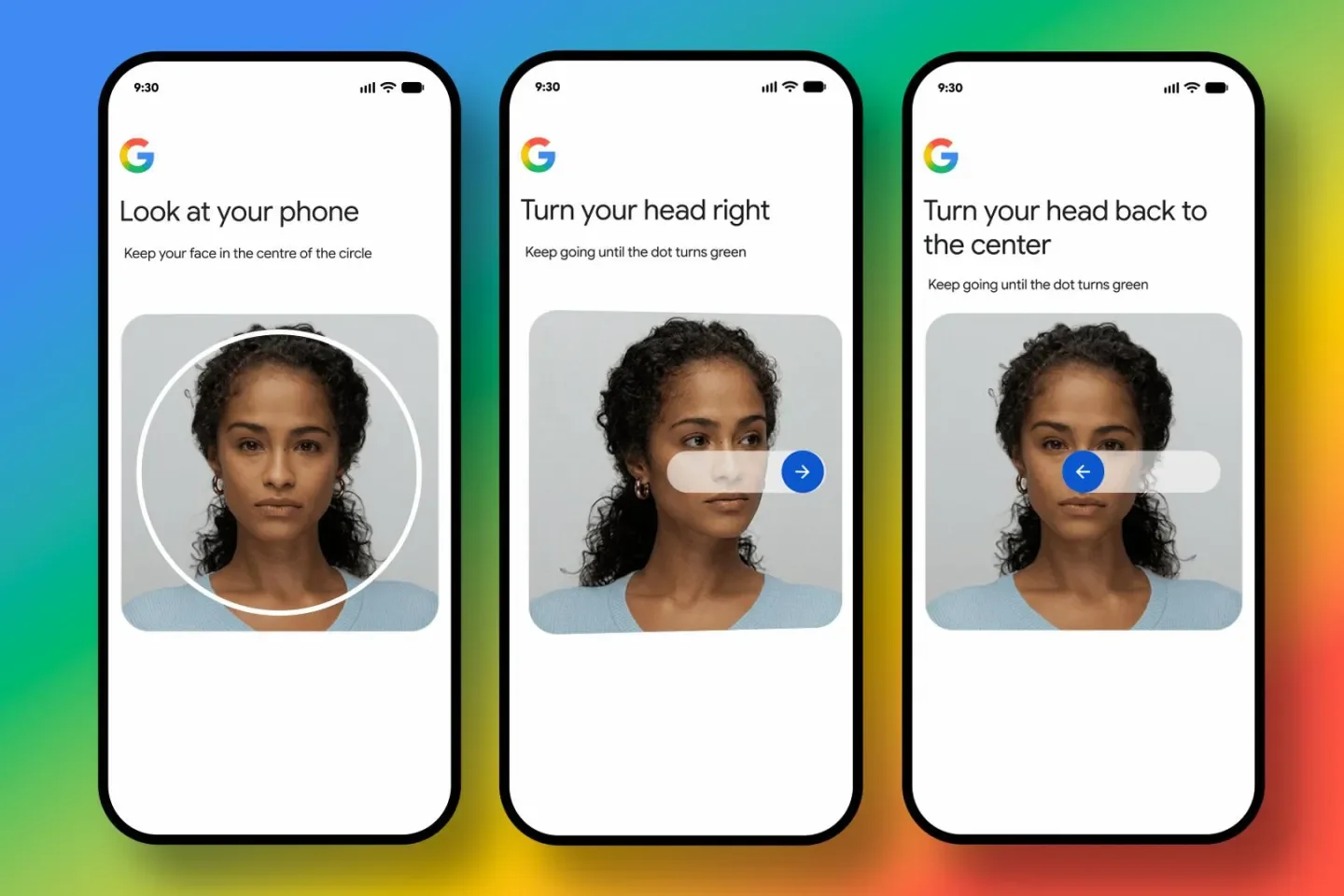
Google has unveiled one of its biggest identity verification updates in recent years—Selfie Video Verification. The new feature allows eligible users to record a short selfie video that can later be used to verify their identity when signing into or recovering a Google Account.
The feature is designed to solve a common problem: getting locked out of your account because you've forgotten your password or lost access to your trusted device. Instead of relying solely on passwords, recovery emails, or SMS verification, Google now offers a biometric backup option based on a secure selfie video.
While the update promises stronger protection against account theft and phishing, it also raises important questions about biometric privacy, data storage, and how Google plans to safeguard users against AI-generated deepfakes.
In this guide, we'll explain everything you need to know.
What Is Google Selfie Video Verification?
Google Selfie Video Verification is a new account recovery and authentication method that allows users to verify their identity using a short recorded video.
Instead of taking a static selfie, users record a brief guided video while following simple head movements requested on-screen. Google stores this encrypted reference video (with the user's consent) and compares it with a fresh live recording whenever identity verification is needed.
The feature acts as an additional recovery method, not a replacement for passwords, passkeys, or two-factor authentication.
Why Did Google Launch This Feature?
Millions of Google users lose access to their accounts every year because they:
- Forget passwords
- Lose smartphones
- Change phone numbers
- Lose access to recovery emails
- Cannot receive OTPs
- Get locked out while traveling
Traditional recovery methods don't always work in these situations.
Google says the new selfie verification system offers another secure recovery option while reducing the chances of fraud or identity theft.
How Google Selfie Video Verification Works
The process is intentionally simple.
Step 1: Record Your Selfie Video
Users open Google Account security settings and follow guided instructions.
Google asks users to:
- Look directly at the camera
- Slowly move their head
- Capture multiple facial angles
The entire process takes only a few seconds.
Step 2: Google Encrypts the Video
Once recorded:
- The video is encrypted.
- It is securely stored in your Google Account.
- Only you control it.
- You can delete it whenever you want.
Google says the video is stored only after obtaining user consent.
Step 3: Future Sign-In Verification
If you're locked out later:
- Google asks you to record another short selfie video.
- The new recording is compared with the stored reference video.
- Identity is verified only if both videos match.
Liveness Detection Makes the Difference
One major reason Google chose video instead of photos is liveness detection.
A normal photo can sometimes be spoofed.
A guided video is much harder to fake.
During verification Google checks:
- Facial movements
- Head rotation
- Multiple viewing angles
- Real-time responses
- Live video characteristics
This makes it significantly more difficult to fool the system using screenshots or pre-recorded videos.
Can Google Detect AI Deepfakes?
Yes.
Google says multiple security layers help detect impersonation attempts.
These include:
- Deepfake detection
- Facial comparison
- Liveness verification
- Suspicious sign-in analysis
- Risk scoring
Rather than relying only on face matching, Google also analyzes whether the uploaded video appears to come from a real person in real time.
Is Your Selfie Video Safe?
This is the biggest question users are asking.
According to Google:
- Videos are encrypted while stored.
- Recording requires user permission.
- Videos can be deleted anytime.
- By default, videos are used only for sign-in and account recovery.
- Additional uses require users to explicitly opt in.
That means users remain in control of their biometric data.
Does Google Already Have Your Face?
Many users wonder:
"Google Photos already recognizes faces. Why do they need another selfie?"
The answer is different use cases.
Google Photos uses facial recognition for organizing images.
Selfie Video Verification is specifically designed for identity authentication, using a live video instead of static facial images.
The authentication process includes additional security checks that ordinary photos cannot provide.
How Is This Different From Face ID?
Many people compare Google's feature with Apple's Face ID.
| Apple Face ID | Google Selfie Video |
|---|---|
| Device-based | Cloud-backed account recovery |
| Unlocks device | Recovers Google Account |
| Infrared sensors | Standard camera |
| Stored on device | Encrypted in Google Account |
| Device authentication | Online identity verification |
Although both rely on facial verification, they solve different problems.
Who Can Use It?
Google says the rollout has started for eligible Google Account users.
Availability is being expanded gradually, so not every account will receive the feature immediately. Users can check whether it's available from their Google Account security settings.
When Should You Use It?
This feature can be especially useful if you:
- Frequently travel
- Change smartphones often
- Use multiple devices
- Forget passwords
- Lose SIM cards
- Manage important Gmail accounts
- Use Google Workspace
- Store business documents in Google Drive
It adds another recovery option if traditional methods are unavailable.
What Happens If Someone Steals Your Phone?
Even if someone gains physical access to your phone, Google says a live selfie verification must still match the enrolled video. The company also combines this with its existing security systems, such as device reputation and suspicious sign-in detection, to reduce the risk of unauthorized access.
Privacy Concerns Users Should Know
Despite Google's assurances, privacy advocates continue to debate biometric authentication.
Common concerns include:
- Cloud storage of biometric data
- Future use of facial information
- Government requests
- AI training concerns
- Data breaches
Google states that users control the stored video, can delete it at any time, and must explicitly opt in before it is used for purposes beyond sign-in and recovery.
How to Enable Google Selfie Video Verification
If your account is eligible:
- Open Google Account.
- Go to Security.
- Open Sign-in & Security.
- Select Selfie Video (if available).
- Record the guided verification video.
- Save your setup.
The feature is rolling out in phases, so it may not appear immediately for every user.
Best Security Practices Even After Enabling It
Selfie verification is designed as an additional safeguard, not a complete replacement for other security tools. For stronger account protection, continue to:
- Use a strong, unique password.
- Enable two-factor authentication (2FA).
- Set up passkeys where supported.
- Add a recovery phone number.
- Add a recovery email.
- Store backup codes securely.
- Review account activity regularly.
Combining multiple recovery methods provides better protection than relying on any single option.
Advantages of Google Selfie Video Verification
- Easier account recovery
- Stronger fraud protection
- Better resistance to phishing
- Designed to detect deepfakes
- Simple setup process
- User-controlled biometric data
- Can be deleted anytime
- Works as an additional recovery layer
Potential Limitations
- Not yet available to all users
- Requires a working camera
- Relies on cloud storage for the encrypted reference video
- Some users may remain uncomfortable sharing biometric information
- Cannot replace good password hygiene or multi-factor authentication
Frequently Asked Questions (FAQ)
What is Google Selfie Video Verification?
It is a new Google Account recovery and sign-in method that verifies your identity using a short guided selfie video.
Is Google replacing passwords?
No. Passwords, passkeys, recovery emails, and two-factor authentication remain available. Selfie Video is an additional recovery option.
Can I delete my selfie video?
Yes. Google says users can delete their stored selfie video whenever they choose.
Does Google use my video for AI training?
By default, Google says the stored video is used only for sign-in and account recovery. Any broader use requires users to opt in.
Does it stop deepfake attacks?
Google says the feature uses multiple security checks, including liveness verification and comparison with the enrolled selfie video, to help detect impersonation attempts and deepfakes.
Is the feature available worldwide?
Google is rolling it out gradually to eligible Google Account users, so availability varies by account and region.
Final Verdict
Google's Selfie Video Verification represents a significant step toward password-independent account recovery. Rather than replacing traditional security measures, it adds another recovery path for users who lose access to their devices or credentials. By combining encrypted storage, guided facial movements, liveness detection, and anti-deepfake checks, Google aims to make account recovery both more secure and more convenient.
For most users, enabling the feature—while continuing to use strong passwords, passkeys, and two-factor authentication—can improve account resilience. Those with heightened privacy concerns may prefer to wait, review Google's data handling policies, or rely on existing recovery methods until they are comfortable adopting biometric verification.
Source - https://www.theverge.com/tech/969361/google-account-sign-in-selfie-video-security