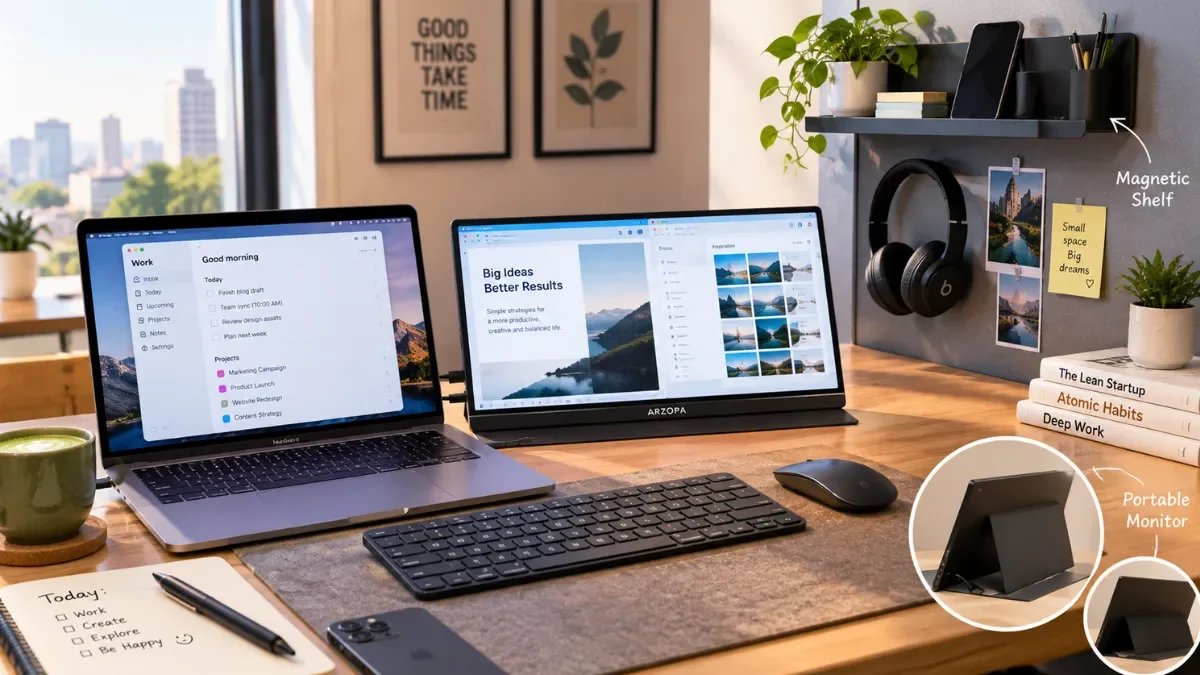
The remote-work desk is getting smaller, but the amount of work happening on it isn't. In September 2026, Portable Laptop Monitor and Magnetic Shelf are both showing major breakout growth, according to Exploding Topics, with each currently at around 6.6K monthly searches.
Portable laptop monitors are up 838%, while magnetic shelves have grown 983% on the platform. Together, the two trends point toward the same consumer priority: getting more functionality from less physical space.
For people working between home, cafés, coworking spaces and temporary desks, the question is no longer simply how to build a bigger office. It is how to build a useful workstation that can disappear into a bag or fit into a small corner when the workday ends.
Why are portable laptop monitors suddenly trending?
A laptop is convenient because it combines the computer and screen into one device. The problem appears when work involves several windows at once.
A video call may need to stay open while a document, spreadsheet, browser or research material occupies the other screen. Constantly switching between windows works, but it can make a simple workflow feel unnecessarily fragmented.
That's where portable monitors come in.
They are essentially thin external displays that can travel with the laptop. Depending on the model, they can connect through USB-C or HDMI and act as a second screen without requiring a permanent desk setup.
Current trend data places Portable Laptop Monitor at 6.6K search volume and +838% growth, making it one of the fastest-rising product searches tracked by Exploding Topics.
The appeal is particularly obvious for mobile professionals: one laptop plus one thin monitor can create a dual-screen workstation without carrying a traditional desktop monitor.
Are portable laptop monitors actually useful for remote work?
For the right workflow, yes.
The biggest advantage isn't necessarily better image quality. It's additional screen real estate.
You can keep Slack, email or a video meeting on one display while working on a spreadsheet, CMS, browser or editing application on the other.
For example:
| Work type | Laptop screen | Portable monitor |
|---|---|---|
| Writing | Document | Research/browser |
| SEO | CMS | Search results/GSC |
| Meetings | Video call | Notes/document |
| Coding | Code editor | Browser/debugging |
| Design | Main canvas | Tools/reference |
| Finance | Spreadsheet | Research/data |
| Student work | Assignment | Study material |
This is why a portable monitor can make more sense than simply buying a larger laptop.
You aren't replacing the laptop screen. You're adding another workspace to it.
What should you check before buying a portable monitor?
Not every portable monitor is automatically a good buy.
1. USB-C compatibility
A USB-C port doesn't always mean it can send video.
For a simple one-cable setup, the laptop's USB-C port needs to support the appropriate video output standard, such as DisplayPort Alt Mode. Some monitors also support HDMI for broader compatibility.
2. Weight
Portability becomes less attractive if the monitor is heavy enough to make your laptop bag uncomfortable.
Around 0.7–1kg is a reasonable range for many conventional 15.6-inch portable displays.
For example, MSI's PRO MP165 E6 weighs 0.78kg, while the ASUS ZenScreen MB16ACV is listed at 0.9kg.
3. Brightness
A portable display used indoors doesn't need the same brightness as a premium outdoor screen.
If you regularly work outdoors or near bright windows, however, a brighter panel becomes more useful.
4. Resolution
Full HD is still enough for general office work, writing, spreadsheets and browsing.
Higher-resolution models make more sense for photography, video editing, design or users who simply prefer sharper text.
5. Stand and orientation
A built-in kickstand or protective cover that doubles as a stand can make a huge difference.
Also check whether the monitor supports portrait orientation if you frequently read long documents, code or webpages.
Which portable laptop monitors are worth considering?
There isn't one perfect portable monitor for everyone. The best choice depends on whether you're prioritising price, weight, resolution, connectivity or colour quality.
ASUS ZenScreen MB16ACV
The ASUS ZenScreen MB16ACV is a straightforward productivity-focused option.
It has a 15.6-inch Full HD IPS display, 250-nit typical brightness, 60Hz refresh rate and USB-C connectivity with DisplayPort Alt Mode. It weighs about 0.9kg.
It makes the most sense for someone who wants a familiar, simple second-screen setup rather than a gaming-oriented display.
MSI PRO MP165 E6
MSI's PRO MP165 E6 is another productivity-focused 15.6-inch option.
It uses a Full HD IPS panel with a 60Hz refresh rate, has two USB-C ports plus HDMI, weighs 0.78kg and includes a 75mm VESA mounting option.
Its lighter weight gives it an advantage for people who expect to carry the monitor regularly.
ARZOPA Z3FC
ARZOPA's Z3FC moves into a higher-resolution, higher-refresh-rate category.
Current reviews have highlighted it as a strong all-round portable monitor, with a 16.1-inch QHD display and 180Hz refresh rate, making it more interesting for people who want their portable display to handle both work and entertainment.
It is more than most people need for email and documents, but makes more sense for creators and users who want a more capable display.
Portable monitor comparison: which one fits your setup?
| Monitor | Screen | Resolution | Refresh rate | Weight | Best for |
|---|---|---|---|---|---|
| ASUS ZenScreen MB16ACV | 15.6" | 1920×1080 | 60Hz | 0.9kg | Office & remote work |
| MSI PRO MP165 E6 | 15.6" | 1920×1080 | 60Hz | 0.78kg | Lightweight productivity |
| ARZOPA Z3FC | 16.1" | 2.5K | 180Hz | — | Work + entertainment |
Important: prices and availability can change substantially between sellers and regions, so check the current listing before buying.
What are magnetic shelves and why are they trending?
The second breakout trend is much simpler.
A magnetic shelf is a storage shelf that attaches to a compatible metal or magnetic surface without conventional drilling or permanent installation.
Exploding Topics currently lists Magnetic Shelf at 6.6K search volume with +983% growth.
The attraction is easy to understand in smaller workspaces.
Instead of placing your phone, notebook, charging accessories, headphones or small stationery items directly on the desk, a shelf can move some of those objects upward or onto another available surface.
That creates a little more usable desk space without buying a larger desk.
Are magnetic shelves really useful for a desk?
They can be, but there is an important catch: the mounting surface matters.
A magnetic shelf generally needs a suitable metal or magnetic surface. It won't magically stick to every painted wall, wooden desk or glass tabletop.
Some products are designed specifically for magnetic panels, while others attach directly to steel surfaces.
For example, VIVO's 16-inch magnetic shelf uses four magnets and is designed for flat steel surfaces. The company lists a capacity of up to 11 pounds on thinner metal and 22 pounds on thicker steel, subject to the surface conditions.
Yamazaki's smaller TOWER Magnetic Shelf is designed for magnetic panels and supports a maximum load of 1kg.
That difference shows why buyers should never judge magnetic storage purely by appearance.
How can you make a small desk feel bigger?
You don't necessarily need a larger desk.
Try moving the things that don't need to occupy the main working surface.
A simple space-saving setup
- Keep the laptop in the centre of the desk.
- Place the portable monitor beside it when you need a second display.
- Move stationery upward or sideways using a magnetic shelf or organiser.
- Use a vertical stand for your phone or tablet instead of laying it flat.
- Route charging cables behind the desk rather than across the workspace.
- Keep only daily-use items within arm's reach.
- Pack the portable monitor away after work if your desk doubles as a dining or living space.
The idea is simple: don't make the desk bigger if you can make the objects occupying it smaller, thinner or vertical.
Can a portable monitor replace a proper desktop monitor?
Usually, no.
A portable monitor is designed around flexibility. A traditional desktop monitor generally wins when you want a large display, ergonomic adjustability, higher sustained brightness, stronger speakers or a more permanent setup.
The distinction is similar to the difference between a travel chair and an office chair.
One is designed to be moved. The other is designed to stay put and maximise comfort.
For someone who works from one dedicated home office every day, a 24-, 27- or larger desktop monitor may make more sense.
For someone who works from multiple locations, portability becomes a much bigger part of the equation.
What about dual-screen laptop extenders?
There is another category between a normal portable monitor and a complete multi-monitor workstation: laptop screen extenders.
These attach to or sit behind the laptop and can provide two additional screens.
They are useful for people who genuinely need three displays, such as traders, developers and professionals who keep multiple dashboards open.
But they also introduce more weight, more cables and more setup complexity.
For most remote workers, one good portable monitor is the better starting point.
Magnetic shelf vs portable monitor: are they solving the same problem?
Not really.
They are trending at the same time because they solve two different versions of the same broader problem: limited workspace.
| Feature | Portable monitor | Magnetic shelf |
|---|---|---|
| Main purpose | Add screen space | Add storage space |
| Helps with | Multitasking | Desk organisation |
| Portable | Yes | Usually |
| Needs compatible surface | No | Usually |
| Adds desk capacity | Indirectly | Directly |
| Best for | Remote professionals | Small desks |
| Main drawback | Extra weight/cables | Surface compatibility |
A portable monitor makes the digital workspace bigger.
A magnetic shelf makes the physical workspace more efficient.
Can you combine both in one nomad setup?
Yes, and this is where the two trends become particularly interesting.
Imagine a small desk in a bedroom, coworking space or hotel room.
The laptop sits in the centre. A portable monitor creates a second screen. A small magnetic shelf or organiser keeps your phone, charging accessories and stationery away from the main work area.
Instead of adding a large monitor, drawers and multiple desk accessories, the setup stays compact.
The entire workstation can potentially be packed away when the workday ends.
Are portable laptop monitors worth the hype in 2026?
For frequent travellers, hybrid workers, freelancers, students and people working from small desks, a portable monitor can absolutely be worth it.
But it isn't automatically a productivity upgrade for everyone.
If your daily work consists mostly of email and one application at a time, your laptop screen may already be enough.
If you're constantly switching between documents, spreadsheets, browsers, meetings and reference material, the second screen can make a much stronger case.
The same logic applies to magnetic shelves. They are useful when they solve a genuine storage problem, not simply because they are trending.
What is the ideal minimalist nomad desk setup?
A practical mobile setup could contain:
- Laptop
- One portable monitor
- USB-C cable
- Compact wireless keyboard
- Wireless mouse or trackpad
- Foldable laptop stand
- Small charger
- Magnetic or compact organiser
- Cable pouch
That's enough to create a surprisingly capable workstation without recreating an entire office.
The goal shouldn't be to own the most accessories.
It should be to carry the smallest number of things that meaningfully improve the way you work.
FAQs
Are portable laptop monitors worth buying?
They are most useful for people who regularly multitask or work away from a permanent desk. If you mainly use one application at a time, the benefit may be smaller.
Can a portable monitor work with any laptop?
Not necessarily. Check whether your laptop supports video output through USB-C or whether the monitor provides another compatible input such as HDMI.
What is a magnetic shelf?
A magnetic shelf uses magnets to attach to suitable metal or magnetic surfaces, providing extra storage without conventional drilling or permanent installation.
Do magnetic shelves work on wooden desks?
A conventional magnetic shelf generally needs a compatible metal or magnetic mounting surface. Some products use adhesive-backed magnetic strips or separate mounting systems, so check the individual product specifications.