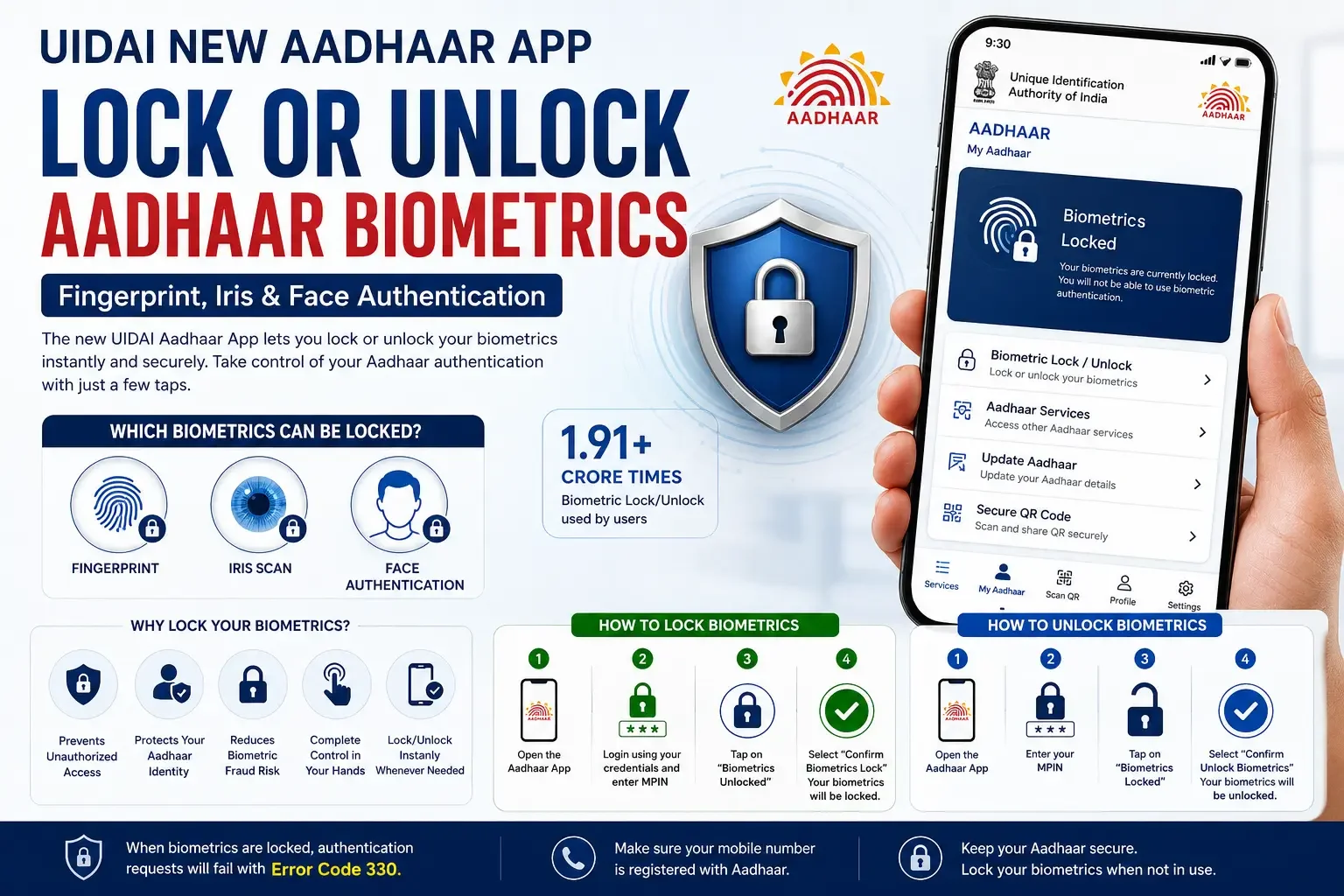
The Unique Identification Authority of India (UIDAI) has introduced an enhanced Aadhaar App that gives users greater control over their biometric information. One of its most important features allows Aadhaar holders to instantly lock or unlock fingerprint, iris, and face biometrics directly from their smartphone.
According to UIDAI, this security feature has already been used more than 1.91 crore (19.1 million) times, helping users prevent unauthorized biometric authentication and improve the security of their Aadhaar identity.
Quick Answer
Can you lock or unlock Aadhaar biometrics using the new Aadhaar App?
Yes.
The new UIDAI Aadhaar App lets users lock or temporarily unlock their biometric data—including fingerprints, iris scans, and facial authentication—with just a few taps. When biometrics are locked, they cannot be used for Aadhaar authentication until you unlock them again.
What Is Aadhaar Biometric Lock?
Biometric Lock is a privacy feature provided by UIDAI that prevents anyone from using your Aadhaar biometrics for authentication.
The feature protects:
- Fingerprints
- Iris Scan
- Face Authentication
Once enabled, biometric authentication requests will automatically fail until you manually unlock your biometrics.
Why Should You Lock Your Aadhaar Biometrics?
Locking your biometrics adds an extra layer of security against misuse.
Benefits include:
✅ Prevents unauthorized fingerprint authentication
✅ Protects your Aadhaar identity
✅ Reduces biometric fraud risk
✅ Gives complete control over biometric usage
✅ Can be unlocked instantly whenever needed
This is especially useful if you rarely use biometric authentication or want additional protection against identity misuse.
Which Aadhaar Biometrics Can Be Locked?
The UIDAI allows users to lock all major biometric identifiers:
| Biometric | Can Be Locked? |
|---|---|
| Fingerprint | ✅ Yes |
| Iris Scan | ✅ Yes |
| Face Authentication | ✅ Yes |
When locked, none of these biometric methods can be used to verify your Aadhaar identity until they are unlocked.
How to Lock Aadhaar Biometrics Using the New Aadhaar App
Follow these simple steps:
Step 1
Open the new UIDAI Aadhaar App.
Step 2
Log in using your registered credentials and enter your MPIN.
Step 3
Tap "Biometrics Unlocked."
Step 4
Select "Confirm Biometrics Lock."
Your Aadhaar fingerprint, iris, and face biometrics will now be locked instantly.
How to Unlock Aadhaar Biometrics
Whenever biometric authentication is required, you can temporarily unlock them.
Step 1
Open the Aadhaar App.
Step 2
Enter your MPIN.
Step 3
Tap the Biometrics Locked icon.
Step 4
Select "Confirm Unlock Biometrics."
Your Aadhaar biometrics will become available for authentication again.
Who Can Use This Feature?
You can use biometric locking if:
- You have a valid Aadhaar number.
- Your mobile number is registered with Aadhaar.
- You are using the new UIDAI Aadhaar App.
Without a registered mobile number, this feature cannot be activated through the app.
What Happens After Locking Biometrics?
Once your Aadhaar biometrics are locked:
- Fingerprint authentication stops.
- Iris authentication stops.
- Face authentication stops.
- Any biometric authentication attempt will fail.
UIDAI states that authentication requests using locked biometrics return Error Code 330, indicating the biometrics are locked.
What If You Lose Your Phone?
UIDAI notes that if you lose the phone or SIM linked to the Aadhaar App, you may temporarily lose access to the app until you regain access or complete the recovery process. Keep your registered mobile number active and secure.
Why This Feature Matters
Digital identity theft and biometric misuse remain growing concerns. By allowing users to instantly disable biometric authentication, UIDAI gives Aadhaar holders more direct control over their identity.
The feature is particularly useful for:
- Senior citizens
- Frequent travelers
- Banking users
- Government scheme beneficiaries
- Anyone who rarely uses biometric authentication
Frequently Asked Questions
Can I lock only my fingerprint?
No. The biometric lock covers fingerprint, iris, and face authentication together.
Can I still use OTP authentication after locking biometrics?
Yes. Locking biometrics only affects biometric-based authentication. OTP-based services continue to work where supported.
Is biometric lock free?
Yes. UIDAI provides this feature free of charge through the official Aadhaar App.
Can I unlock biometrics anytime?
Yes. You can unlock them instantly from the Aadhaar App whenever biometric authentication is required.
Final Thoughts
The new UIDAI Aadhaar App makes managing biometric security much easier. Whether you're concerned about identity theft or simply want greater control over your Aadhaar information, the biometric lock feature provides a quick and effective safeguard.
If you don't frequently use fingerprint or iris authentication, keeping your biometrics locked and unlocking them only when necessary is a practical way to enhance your Aadhaar security.