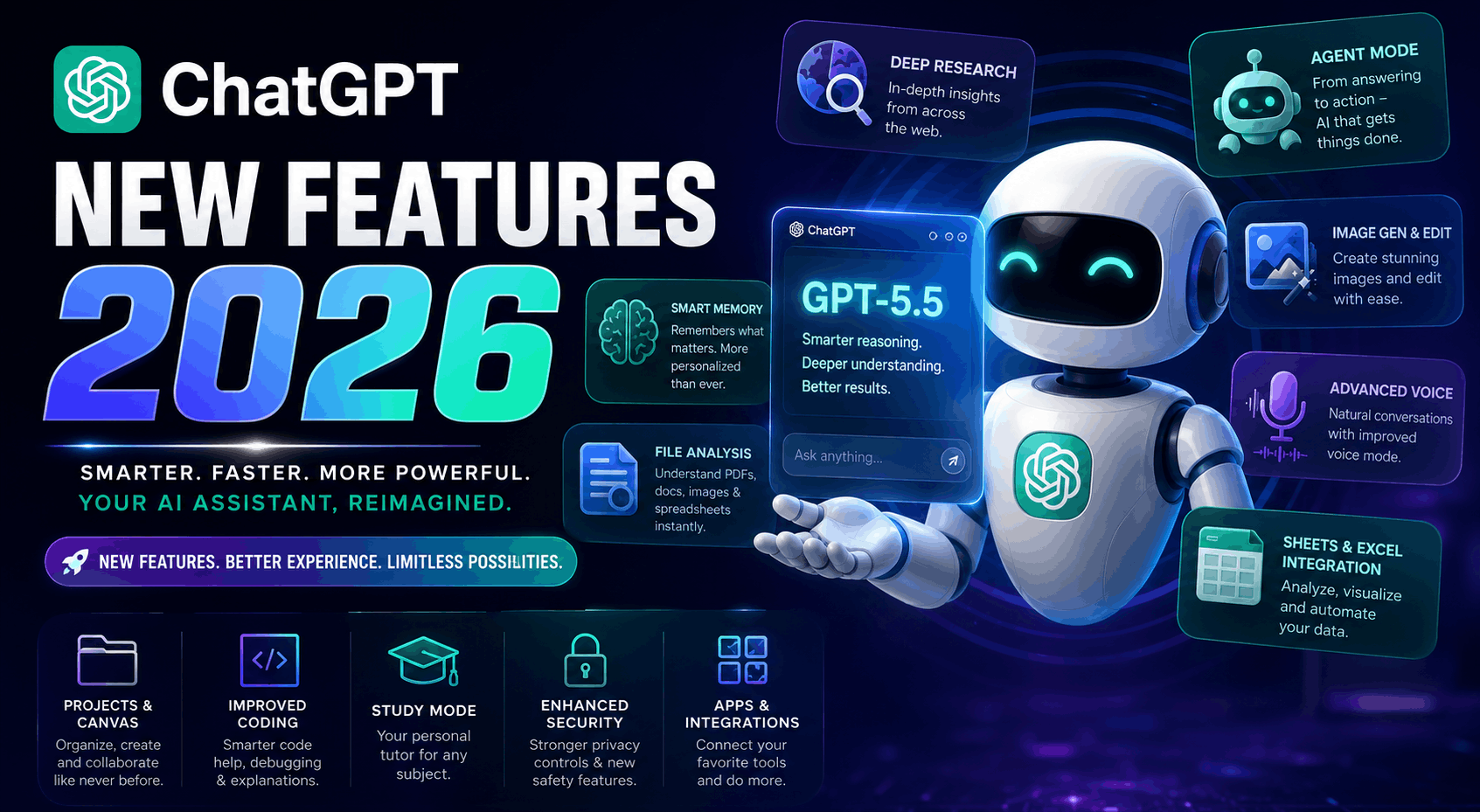
ChatGPT in 2026 is no longer just a chatbot that writes emails, answers questions and occasionally apologises after confidently inventing something.
It is gradually becoming an entire AI workspace.
It can search the internet, study documents, analyse spreadsheets, generate and edit images, remember useful details, talk through voice, connect with workplace apps and even complete multi-step tasks through agent-style tools.
That sounds impressive, but it also creates a new problem: there are now so many features and subscription plans that choosing the right one can feel harder than choosing what to watch on Netflix.
So, what is actually new in ChatGPT in 2026? Which features are genuinely useful? And should you choose ChatGPT Free, Go, Plus, Pro, Business or Enterprise?
Let us break it down without turning this into an AI dictionary.
What Is New in ChatGPT in 2026?
The biggest change is not one single feature. It is the way all the features now work together.
Earlier versions of ChatGPT mainly responded to whatever you typed into the current conversation. The newer experience can work with files, images, voice, web sources, connected apps, previous conversations and specialised tools.
In simple terms, ChatGPT is moving from:
“Ask me a question and I will answer it.”
to:
“Give me a goal, some context and the necessary access, and I will help you complete the work.”
That shift is important for students, developers, creators, researchers, office workers and businesses.
GPT-5.5: The Brain Behind the New ChatGPT
GPT-5.5 is the main intelligence powering many of ChatGPT’s newest capabilities in 2026.
It is designed to provide clearer responses, follow complicated instructions more reliably and handle different types of information, including text, images, files and audio.
For everyday users, that means ChatGPT should be better at understanding what you actually want instead of answering only the most literal version of your request.
For example, you can ask it to:
- Review a resume and rewrite weak sections.
- Analyse a screenshot of an error.
- Compare information across multiple uploaded documents.
- Explain a difficult topic at beginner, intermediate or expert level.
- Help plan and complete a multi-step project.
- Work through complex coding, research or business problems.
Paid users can generally access higher limits and more control over advanced reasoning modes, while Free users receive more restricted access.
Instant, Thinking and Pro-Level Reasoning
Not every question needs the same amount of brainpower.
Asking ChatGPT to correct a sentence should not require the same level of reasoning as analysing a business strategy, debugging a large application or comparing complicated financial documents.
That is why newer ChatGPT plans may offer different reasoning options.
Instant mode is intended for quick everyday responses.
Thinking mode spends more effort on difficult, multi-step tasks.
Pro-level reasoning is designed for heavier work where accuracy, depth and careful analysis matter more than speed.
Think of it like travelling:
Instant is your scooter for nearby work.
Thinking is your car for a longer journey.
Pro is the slightly expensive vehicle you book when the road disappears halfway through the mountains.
Smarter Memory and Personalisation
Memory is one of the most important ChatGPT improvements because it reduces the need to repeat yourself in every new conversation.
ChatGPT can remember useful information such as:
- Your preferred writing style.
- The type of work you do.
- Projects you are building.
- Your learning level.
- Formatting preferences.
- Regular goals or routines.
In 2026, OpenAI has continued improving how ChatGPT uses saved memories and relevant context from earlier conversations.
This can make responses feel more personalised. A developer may receive code suited to their usual stack, while a blogger may receive content matching their preferred tone and structure.
However, memory should not be confused with perfect human memory. ChatGPT can still misunderstand context, retain something unhelpful or miss an important detail.
Users can review, remove or disable memory. Temporary Chat also remains useful for conversations that should not affect future responses.
Deep Research for Serious Internet Research
Normal web search finds pages.
Deep Research is designed to investigate a question across several sources and produce a more organised report.
You can use it for tasks such as:
- Comparing laptops before buying.
- Researching a company before an interview.
- Studying market trends.
- Planning a detailed trip.
- Comparing government policies.
- Creating a report using multiple credible sources.
- Investigating a technical or academic subject.
Instead of opening twenty tabs and forgetting why eleven of them are open, you can ask ChatGPT to gather information, compare claims and present the findings in a structured form.
Deep Research is particularly useful when a question cannot be answered properly from a single webpage.
It is not a replacement for checking critical information yourself, especially in medical, legal and financial situations. But it can dramatically reduce the time required to collect and organise material.
ChatGPT Agent: From Answering to Doing
ChatGPT Agent represents one of the biggest changes in how people may use AI.
A normal chatbot tells you what to do.
An agent can potentially perform a sequence of steps using available tools.
Depending on your plan, region and connected services, agent-style features can help with tasks such as:
- Researching products and organising comparisons.
- Reading information from websites.
- Working with connected apps.
- Preparing reports.
- Managing multi-stage workflows.
- Creating documents from collected information.
- Handling repetitive digital tasks.
The key difference is that the agent works toward an objective rather than responding to one isolated prompt.
For example, instead of asking:
“Which hotels are good in Goa?”
you may give it a broader task:
“Compare hotels near the beach within my budget, check their major differences and organise the best options for a three-day trip.”
Agent tools are powerful, but they also require attention. Users should review important actions, especially when money, private data, bookings or external accounts are involved.
An AI assistant is helpful. An AI assistant with permission to click things deserves slightly more supervision.
Better Web Search and Product Comparison
ChatGPT Search has become more useful for questions that depend on current information.
It can search the web and provide answers about:
- Recent news.
- Product specifications.
- Sports information.
- Travel planning.
- Software updates.
- Current public information.
- Prices and availability.
- Events and entertainment.
In newer versions, shopping-related responses may also compare products using details such as features, pricing and reviews.
This makes ChatGPT useful during the early stages of a purchase, when you need to understand the differences between several options rather than immediately buy the first product with “ULTIMATE PRO MAX” in its name.
Users should still verify the final price, seller, warranty and availability before purchasing.
ChatGPT Images: Generate and Edit Visuals
Image generation is now built directly into ChatGPT across multiple plans, although limits differ.
You can ask ChatGPT to create:
- Blog banners.
- Posters.
- Social-media graphics.
- Product concepts.
- Illustrations.
- Thumbnails.
- Story scenes.
- Presentation visuals.
- Logo concepts.
- Simple educational diagrams.
Image editing has also become more useful. You can upload an existing image and request changes such as removing an object, changing the background, modifying colours or transforming the visual style.
This is useful for bloggers, marketers and small businesses that cannot hire a designer for every small graphic.
It still does not replace an experienced designer for precise branding work, print production or complex layouts. But for quick concepts and everyday creative work, it can save a great deal of time.
File Uploads and Data Analysis
ChatGPT can work with documents, spreadsheets, PDFs, images and structured data.
You can upload a file and ask it to:
- Summarise a long document.
- Explain a report in simple language.
- Find important information.
- Compare two documents.
- Identify patterns in spreadsheet data.
- Clean and reorganise data.
- Create formulas.
- Generate tables and charts.
- Review contracts or policies for general understanding.
- Extract action points from meeting notes.
This feature is valuable because users do not always need a new answer. Sometimes they need help understanding information they already have.
However, highly confidential business, financial, legal or personal files should be handled carefully. Check your organisation’s data policy before uploading sensitive material.
ChatGPT for Excel and Google Sheets
One of the notable 2026 additions is deeper spreadsheet integration.
ChatGPT for Excel and Google Sheets can help users work inside spreadsheets instead of constantly moving data between different tabs and applications.
It may assist with:
- Writing and explaining formulas.
- Updating models.
- Analysing financial data.
- Finding unusual values.
- Cleaning messy columns.
- Generating summaries.
- Running scenarios.
- Understanding spreadsheet logic.
This is useful for analysts, accountants, business owners, operations teams and anyone who has ever looked at a complicated formula and briefly considered changing careers.
The spreadsheet integrations are available across ChatGPT plans, although advanced usage and limits may still depend on the account.
Apps and Connected Services
ChatGPT can connect with supported services so that it can work with information stored outside the chat.
Depending on availability and workspace settings, connected apps may include tools for communication, cloud files, development or workplace productivity.
This can allow ChatGPT to help find relevant information from approved sources without requiring users to manually copy everything into a prompt.
For example, a user might ask it to locate context from files or connected workplace tools and then prepare a summary.
Businesses can control which apps and tools are available within their workspace. Personal users should review permissions before connecting accounts.
The basic rule is simple: do not grant access merely because a button looks exciting.
Workspace Agents for Teams
Workspace agents are designed for repeated organisational workflows.
A company might create an agent that:
- Collects information before a sales call.
- Summarises customer notes.
- Drafts follow-up emails.
- Helps employees find internal policies.
- Organises research.
- Supports a specific department.
Instead of every employee building the same workflow from the beginning, a shared agent can be configured once and improved over time.
This is where ChatGPT begins to look less like an individual chatbot and more like a layer inside a company’s daily operations.
Advanced Voice Mode
Voice mode allows users to speak naturally with ChatGPT and hear spoken replies.
It can be useful for:
- Practising interview answers.
- Improving spoken English.
- Brainstorming while walking.
- Learning through conversation.
- Discussing ideas without typing.
- Getting explanations while doing another task.
Voice can feel much more natural than typing, especially on mobile devices.
However, it should not be treated as a human specialist simply because the voice sounds confident. A pleasant voice can still deliver an incorrect answer with excellent pronunciation.
Projects and Project Memory
Projects help organise chats, files and instructions around a specific topic.
You might create separate projects for:
- A website.
- Exam preparation.
- A business plan.
- A content calendar.
- A research paper.
- Job applications.
- A software product.
Project-based memory helps ChatGPT use relevant context from conversations inside that project while keeping the work more organised.
This is far better than having one enormous conversation containing website bugs, gym plans, movie recommendations and a recipe for paneer butter masala.
Canvas for Writing and Coding
Canvas provides a more focused workspace for editing longer content or code.
Instead of repeatedly asking ChatGPT to rewrite the entire response, you can work on a document more directly.
Canvas is useful for:
- Blog articles.
- Reports.
- Essays.
- Scripts.
- Long emails.
- Website copy.
- Code files.
- Structured revisions.
It makes ChatGPT feel closer to an AI-assisted editor rather than a simple message box.
Codex and Better Coding Workflows
For developers, ChatGPT’s coding capabilities now extend beyond generating isolated snippets.
Codex-related tools can help with:
- Understanding repositories.
- Writing code.
- Fixing bugs.
- Reviewing changes.
- Explaining unfamiliar files.
- Generating tests.
- Refactoring code.
- Handling longer development tasks.
The practical value depends heavily on how much context you provide.
“Fix my code” may produce a guess.
“Here is the component, API response, expected behaviour and console error” gives the AI an actual chance.
Developers should still review generated code for security, performance and logic problems. AI can type quickly, but speed is not the same as knowing why production broke at 2:13 AM.
Study Mode and Learning Tools
Study Mode is designed to help users learn step by step rather than simply receive the final answer.
It may ask questions, provide hints and adjust explanations according to the learner’s progress.
This is useful for:
- Mathematics.
- Programming.
- Science.
- Language learning.
- Interview preparation.
- Exam revision.
- Understanding difficult concepts.
Students receive the most value when they use ChatGPT as a tutor, not as a button that completes every assignment.
Copying an answer may save ten minutes today and create a very uncomfortable examination hall next month.
Health-Focused Experiences
ChatGPT Health is designed to provide a more specialised space for health-related conversations, with separate handling for associated chats, memory and files.
It may help users organise questions, understand general medical information and prepare for conversations with healthcare professionals.
It should not be used as a replacement for a doctor, emergency service, diagnosis or treatment plan.
Its strongest role is helping people understand information and ask better questions—not wearing an imaginary stethoscope.
Improved Security Controls
As ChatGPT connects to more tools and stores more useful context, account security becomes more important.
Newer security features include controls such as:
- Reviewing active sessions.
- Signing out unfamiliar devices.
- Managing memory.
- Disconnecting apps.
- Using Temporary Chat.
- Controlling data preferences.
- Restricting network-connected features through Lockdown Mode where available.
Lockdown Mode can limit tools such as web browsing, agent activity, deep research and certain downloads.
This may be useful for people or organisations that prefer tighter restrictions over maximum convenience.
Are There Ads in ChatGPT?
OpenAI has introduced or tested ads for adult users on Free and Go plans in selected regions.
Ads appear separately from ChatGPT’s answer and are labelled as sponsored content. OpenAI states that advertisements do not influence the assistant’s response.
Plus, Pro and business-focused plans remain ad-free.
Some eligible Free users may also receive an option to remove ads in exchange for lower message limits and reduced access to certain tools.
Availability depends on the country, account and rollout stage, so not every user will see ads.
ChatGPT Free Plan: Who Is It For?
The Free plan is much more capable than the original free version of ChatGPT.
It can provide access to features such as:
- GPT-5.5 with limited usage.
- Web search.
- File and image uploads.
- Basic data analysis.
- Image generation with limits.
- Voice features.
- Access to public GPTs.
- Spreadsheet integrations.
- Limited memory and tools.
Who should use ChatGPT Free?
Choose Free when you:
- Use ChatGPT occasionally.
- Need help with simple writing or study tasks.
- Want to test AI before paying.
- Generate only a few images.
- Do not regularly hit usage limits.
- Can tolerate slower access or restricted premium tools.
For casual users, Free may be all they need.
Do not pay simply because the upgrade button looks emotionally disappointed in you.
ChatGPT Go: The Affordable Upgrade
ChatGPT Go is positioned between Free and Plus.
It offers higher limits for popular features, including more access to GPT-5.5, file uploads, image generation and longer memory.
Pricing and availability can vary by country.
Who should buy ChatGPT Go?
Go is suitable for:
- Students.
- Casual creators.
- Freelancers with light usage.
- People who frequently hit Free limits.
- Users who want more image and file access without paying for Plus.
- Anyone seeking the best low-cost upgrade.
Go is likely the best value for people who use ChatGPT regularly but do not need the most advanced research, agent or professional capabilities.
ChatGPT Plus: The Best Plan for Most Regular Users
ChatGPT Plus generally costs $20 per month, although taxes, currency conversion and app-store pricing may affect the final amount.
It offers higher limits, priority access and expanded use of advanced models and tools.
Depending on rollout and availability, Plus users may receive better access to:
- GPT-5.5.
- Advanced reasoning.
- Deep Research.
- Agent mode.
- Image generation.
- Voice.
- File analysis.
- Projects and Canvas.
- Custom GPT creation.
- Coding tools.
- New features before broader availability.
Who should buy ChatGPT Plus?
Plus is the strongest choice for:
- Developers.
- Bloggers.
- Content creators.
- Researchers.
- Job seekers.
- Frequent learners.
- Freelancers.
- Professionals using ChatGPT every day.
For most individual power users, Plus offers the best balance between price and capability.
It is expensive when used twice a month. It becomes far more reasonable when it saves several hours every week.
ChatGPT Pro: For Heavy and High-Value Work
ChatGPT Pro is designed for people who depend heavily on AI for complex work.
OpenAI currently offers higher Pro tiers, with the main difference being the amount of usage compared with Plus. The highest tier is priced at $200 per month.
Pro provides much higher access to advanced models, deeper reasoning and demanding tools.
Who should buy ChatGPT Pro?
Pro makes sense for:
- AI researchers.
- Full-time developers using agents extensively.
- Data professionals.
- Consultants.
- High-volume creators.
- Founders using ChatGPT across several business functions.
- Professionals whose work justifies the higher cost.
- Users who repeatedly hit Plus limits.
Most people do not need Pro.
Buying Pro only to write captions and birthday messages is like hiring a Formula 1 pit crew to check your scooter’s tyre pressure.
ChatGPT Business: For Teams and Companies
ChatGPT Business is designed for organisations rather than individual users.
It provides a shared workspace, administrative controls, collaboration features and stronger business privacy protections.
OpenAI states that it does not train its models on ChatGPT Business workspace data.
Business subscriptions generally require at least two users. Pricing can vary by country and billing cycle, so companies should check the current checkout page before purchasing.
Who should buy ChatGPT Business?
Business is suitable for:
- Startups.
- Agencies.
- Development teams.
- Marketing departments.
- Sales teams.
- Small and medium-sized companies.
- Organisations sharing custom GPTs or agents.
- Teams handling internal documents.
A solo freelancer will usually receive better value from Plus or Pro.
A growing company that needs central billing, shared tools and admin control should consider Business.
ChatGPT Enterprise: For Large Organisations
Enterprise is designed for large companies requiring stronger governance, support, security and deployment controls.
It can include:
- Enterprise privacy commitments.
- Administrative controls.
- Role-based access.
- Larger usage allowances.
- Workspace management.
- Advanced security.
- App and agent controls.
- Support for large-scale implementation.
- Custom commercial arrangements.
Enterprise pricing is not presented as a simple public monthly subscription. Organisations generally need to contact OpenAI for a quotation.
Who should choose Enterprise?
Enterprise is intended for:
- Large organisations.
- Regulated industries.
- Companies with strict compliance requirements.
- Businesses managing many employees.
- Organisations integrating AI into major internal workflows.
- Teams needing dedicated controls and support.
A three-person startup usually does not need Enterprise unless those three people somehow operate a multinational bank.
ChatGPT Edu: For Universities and Educational Institutions
ChatGPT Edu is designed for universities and academic organisations.
It gives institutions a managed environment for students, faculty and staff, with organisational controls and privacy protections.
Individual students generally do not purchase Edu themselves. The university or institution adopts it.
Which ChatGPT Plan Should You Buy?
Here is the practical answer.
Choose Free when:
You use ChatGPT occasionally and rarely hit the limits.
Choose Go when:
You want a budget-friendly upgrade with more messages, uploads, images and memory.
Choose Plus when:
You use ChatGPT regularly for professional work, coding, research, content or learning.
Choose Pro when:
AI is central to your income or workload and Plus limits interrupt your work.
Choose Business when:
You need a shared workspace, central administration and better organisational data controls.
Choose Enterprise when:
Your organisation requires large-scale deployment, governance, compliance and specialised support.
For most individuals, the real decision is between Free, Go and Plus.
Pro should be purchased because it creates measurable value—not because “Pro” sounds powerful.
Is ChatGPT Plus Worth Buying in 2026?
For a person using ChatGPT several times a week for real work, Plus can be worth it.
A developer may use it for debugging and learning.
A blogger may use it for research, editing and visuals.
A student may use it for personalised explanations and exam preparation.
A business professional may use it for documents, spreadsheets and research.
The value depends on whether ChatGPT saves time, improves output or helps complete work that would otherwise cost more.
The subscription is not automatically productive. You still need clear prompts, reliable information and basic judgement.
Giving a powerful AI a vague instruction produces the digital version of sending an intern into a building and saying, “Just handle everything.”
Will These Features Replace Jobs?
The 2026 updates will automate parts of many jobs, particularly repetitive research, drafting, data organisation and basic content production.
However, most roles involve more than producing an answer.
They require:
- Understanding people.
- Making decisions.
- Taking responsibility.
- Handling unexpected situations.
- Knowing the business context.
- Communicating with teams.
- Checking quality.
- Applying professional judgement.
The more realistic change is that people who use AI effectively may complete certain tasks faster than those who ignore it completely.
The important skill is no longer merely knowing that ChatGPT exists. It is knowing when to use it, what context to provide, how to verify its work and when not to trust it.
What ChatGPT Still Cannot Do Perfectly
Despite all these improvements, ChatGPT can still:
- Produce incorrect information.
- Misunderstand ambiguous instructions.
- Cite weak or irrelevant sources.
- Make mistakes in code.
- Miss details inside documents.
- Produce unrealistic images.
- Give outdated information without web access.
- Sound more certain than it should.
Users must review important outputs.
The better ChatGPT becomes, the easier it is to forget that confidence and correctness are not the same thing.
Final Verdict: ChatGPT Is Becoming an AI Operating System for Everyday Work
ChatGPT’s new features in 2026 show that OpenAI is building far more than a question-and-answer chatbot.
Memory makes it personal.
Deep Research makes it investigative.
Agents make it action-oriented.
Apps make it connected.
Projects and Canvas make it organised.
Voice makes it conversational.
Image generation makes it creative.
Spreadsheet and coding tools make it practical for professional work.
The best plan depends entirely on how often you use these tools and how much value they create.
Casual users should begin with Free.
Budget-conscious regular users should consider Go.
Most professionals will find Plus the sensible middle ground.
Heavy users may justify Pro.
Teams should examine Business, while large organisations should consider Enterprise.
The smartest choice is not the plan with the most features. It is the cheapest plan that reliably handles the work you actually do.
Because paying for twenty powerful AI tools and using only one to improve WhatsApp replies is not digital transformation. It is a very sophisticated subscription collection hobby.